

DAILY ADHKAR TRACKER
Daily Adhkar Tracker for iPhone: A Practical Download Checklist
Use a practical checklist to choose a daily adhkar tracker for iPhone, from in-session progress and reminders to privacy, completion, and focus boundaries.
A useful tracker should make the daily routine easier to follow without pretending that a number can measure religious worth. Start with the reading flow, completion state, privacy, and the next phone action.
01 · PRACTICAL GUIDE
First decide what you want the tracker to do
A search for a daily adhkar tracker can describe several different tools. One person wants a simple custom counter. Another wants a guided morning and evening reader that shows where the current routine stands. Someone else wants reminders, a completion history, or a boundary before distracting apps. These are different jobs, even when the App Store places them under similar names.
Hisn is built around guided morning and evening adhkar rather than an unlimited custom counter. Its reader combines the routine, reading controls, progress, and completion in one sequence. That makes it a relevant option for the guided-routine job, while keeping the product boundary clear for people who need something else.
02 · PRACTICAL GUIDE
Check whether in-session progress is easy to understand
Open a real reading screen and look for three answers: where am I, what is left, and what happens when I tap? A useful progress indicator should remain visible without competing with the content. Counting controls should be large enough to use comfortably, and moving between items should not make the current place ambiguous.
Hisn’s reader keeps Arabic, transliteration, translation, a tap counter, and reading progress in the same focused view. The controls can support different reading needs without turning the session into a dashboard. This guide does not reproduce or invent any religious text; the verified in-app collection remains the source of the reading experience.
03 · PRACTICAL GUIDE
Look for a completion state you can verify
A progress bar is only half the loop. The app should make completion distinct from merely opening the reader or tapping once. A clear finished state helps you understand whether the current morning or evening sequence is complete and whether any connected focus boundary should change.
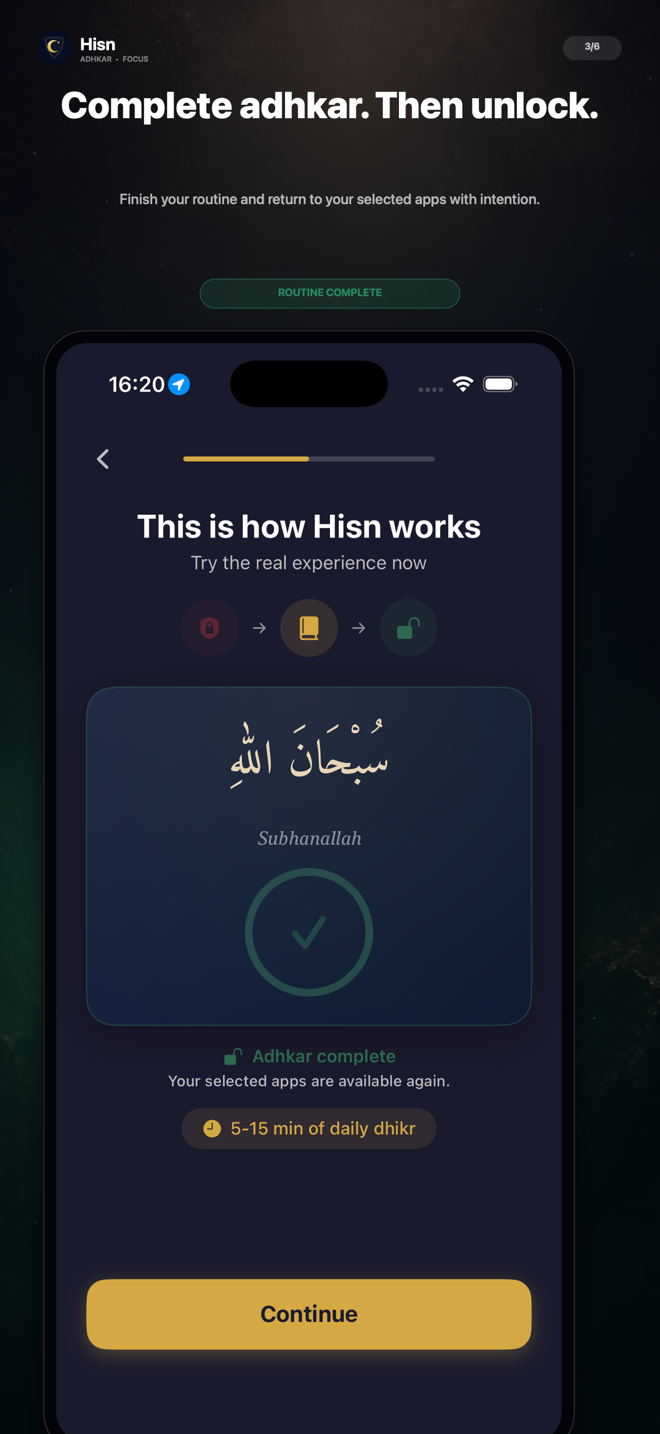
The screen shown on this page is a real Hisn completion flow. It makes the end of the routine visible and shows that selected apps are available again. That is product evidence, not a promise that every day will feel identical or that completing an in-app sequence proves a religious outcome.
04 · PRACTICAL GUIDE
Evaluate reminders without expecting a guarantee
A reminder can make the intended routine easier to find, but iPhone notification permission and device settings still matter. Check whether reminders are connected to the morning or evening action you want and whether tapping one takes you to a useful next step. A generic alert that opens a crowded home screen may add less value than it appears to in a feature list.
Hisn includes reminders for its daily flow. Notification delivery can still be affected by iOS permission and settings, so the app should not promise that every alert will arrive in every circumstance. Treat a reminder as a route back to the routine, not as proof that the routine happened.
05 · PRACTICAL GUIDE
Separate useful progress from personal worth
Daily completion and streak history can answer limited, practical questions: did I finish the selected routine today, and how often did I complete it across recent days? Those records can support planning, but they cannot measure sincerity, religious value, or the quality of a person’s practice. Any app that turns a private routine into a grand score deserves careful scrutiny.
Hisn offers basic on-device progress and streak visibility for the daily routine. Optional Focus Pro tools add deeper streak insights and focus reports for people who want more review. Those advanced views should solve a named need; they are not required simply to make the core reader meaningful.
06 · PRACTICAL GUIDE
Keep a private routine private by design
Progress around a religious routine is sensitive even when it looks like an ordinary count. Before choosing a tracker, ask whether the app requires its own account, whether the history becomes a public profile, and what information is needed for the basic reader to work. A daily tool should explain that boundary in plain language.
Hisn does not require a separate Hisn account. Routine progress, selected-app choices, and prayer settings are designed to remain on your device. That is a specific product boundary; it should not be silently expanded into a claim that no technical data can ever leave a phone or that every outside service follows the same policy.
07 · PRACTICAL GUIDE
Ask what the tracker does when distraction arrives first
Tracking helps after you open the routine. The harder moment may happen one step earlier, when a social, video, news, or entertainment app opens before the routine begins. If that transition matters to you, check whether the product only sends a reminder or can place a visible boundary in front of apps you choose.
Hisn uses Apple’s Screen Time technology so user-selected apps can wait during an active morning or evening routine. You choose the apps and grant the system permission. After the relevant routine is complete, those selected apps become available again. The feature is a deliberate, user-controlled pause—not a claim that the entire iPhone is locked or impossible to bypass.
- 1Choose one routine
Test either the morning or evening flow so the first result has one clear context.
- 2Select one nonessential app
Use a low-risk app that commonly begins an unwanted scroll rather than selecting the whole phone.
- 3Verify the real boundary
Open that app during the active routine and confirm that Apple’s Screen Time shield appears.
- 4Complete and check again
Finish the relevant routine, then verify that the selected app is available and decide whether you still want to open it.
08 · PRACTICAL GUIDE
Run this five-minute checklist before you keep the app
A useful comparison does not need an elaborate setup. Use the same short checklist for each candidate and judge the ordinary reading flow before considering extra reports or customization.
- Confirm whether the app is a guided morning-and-evening reader or a free-form custom counter.
- Check that reading progress and counting controls are clear on your iPhone.
- Finish one routine and verify that completion is visibly different from simply opening it.
- Review reminder permissions and where a notification takes you when tapped.
- Ask whether a separate app account is required and whether progress can remain private.
- Treat streaks as practical history, not as a measure of religious worth.
- If focus matters, test one selected app and verify the real Screen Time behavior.
09 · PRACTICAL GUIDE
Where Hisn fits—and where it may not
Hisn fits someone looking for a guided morning and evening adhkar tracker, a clear reader and completion flow, no separate Hisn account, and an optional boundary before selected distractions. Prayer times and Qibla remain nearby, but the distinguishing sequence is still simple: dhikr before distraction, then a deliberate return.
If Hisn matches the job you wrote down at the beginning, use the App Store link below to inspect the current listing and device compatibility. The same offer and download route remain in place; this guide changes only the search question it helps answer.
CLEAR ANSWERS
Questions about the routine
What is the difference between an adhkar tracker and a dhikr counter?
A tracker can organize a guided routine, show reading progress, record completion, and keep recent history. A free-form counter may only count taps for a custom activity. Check which job you need before downloading.
Does Hisn track morning and evening adhkar progress?
Yes. Hisn shows reading progress, counting controls, completion, and basic on-device progress for its guided morning and evening routine.
Does Hisn require an account to keep progress?
No separate Hisn account is required. Routine progress, selected-app choices, and prayer settings are designed to remain on your device.
Can Hisn remind me to open the relevant routine?
Hisn includes reminders, but iPhone notification permission and device settings affect delivery. A reminder is a route back to the app, not proof that a routine was completed.
Does Hisn lock the whole iPhone?
No. Hisn uses Apple’s Screen Time technology for apps you select during an active morning or evening routine. It does not claim an unbreakable lock of the entire phone.
This guide describes Hisn’s current iPhone and iPad focus flow without promising a guaranteed behavioral, medical, or religious outcome. Current App Store availability and device compatibility are shown by Apple.