

ADHKAR APP CHECKLIST
How to Choose an Adhkar App with Transliteration and Translation
Use a practical checklist to choose an iPhone adhkar app with readable transliteration, translation, counting controls, privacy, and an optional focus boundary.
The right reader is not the one with the longest feature list. It is the one you can read comfortably, understand clearly, and return to without turning a short routine into another distracting phone session.
01 · PRACTICAL GUIDE
Start with the reading support you actually need
Searching for an adhkar app with transliteration and translation can produce a crowded list of similar-looking results. Before comparing icons, ratings, or feature counts, decide what makes a reading session usable for you. You may want Arabic to remain visually primary, transliteration as a reading aid, an English translation for understanding, or a combination you can adjust as your needs change.
That choice should shape the test. A person who reads Arabic comfortably will evaluate the hierarchy differently from someone who relies on transliteration. Neither needs every layer to compete for attention at the same time. Look for controls that let you keep the helpful layer visible without making the card difficult to scan.
02 · PRACTICAL GUIDE
Inspect the reading view, not just the App Store preview
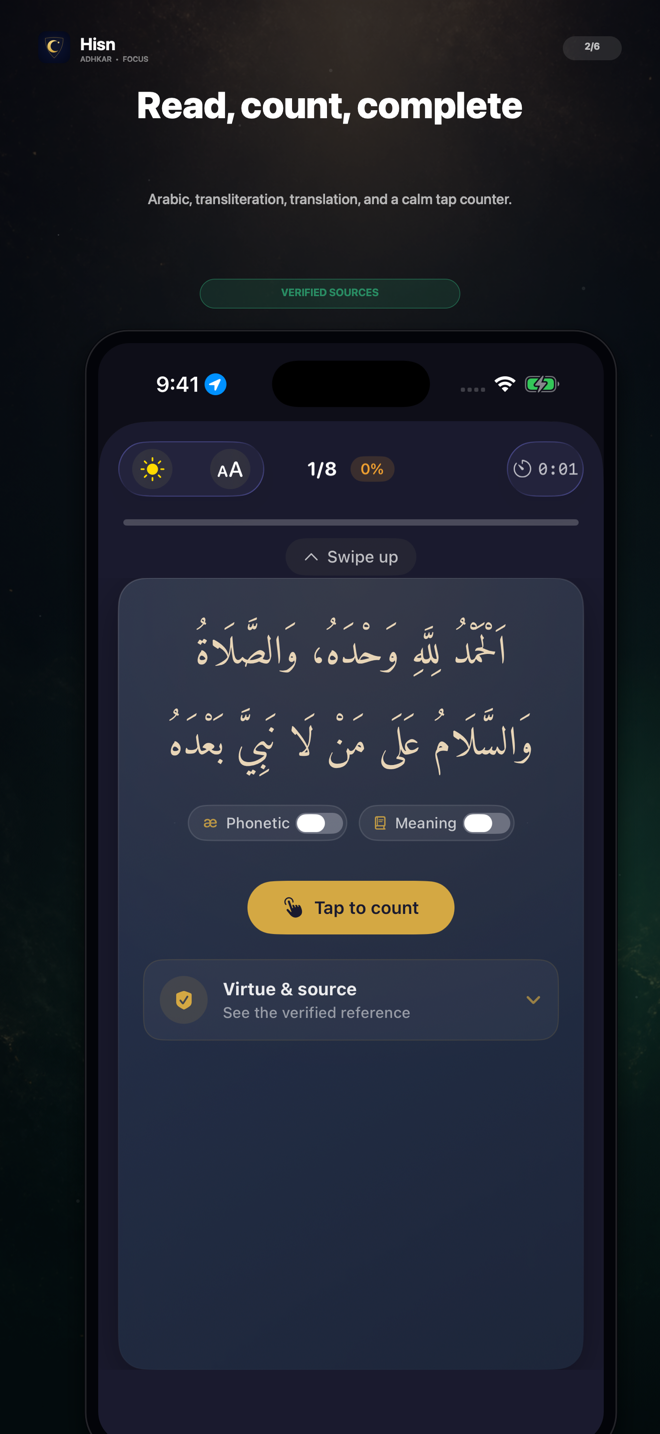
Open an actual reading card and check the visual order. Can you distinguish Arabic, transliteration, and translation without hunting for them? Can you follow a longer card without losing your place? Is the tap target comfortable on the phone you use? These small details matter more over repeated sessions than a large catalog of secondary features.
Hisn’s verified reader screen keeps Arabic, transliteration, translation, progress, and a tap counter in the same focused view. The image on this page is a real product screen from the app. It demonstrates the layout; this guide intentionally does not reproduce, translate, or invent any religious text.
03 · PRACTICAL GUIDE
Test whether counting supports the flow
A counter should answer two questions quickly: where am I, and what happens after the next tap? Test it with one hand. The number should update clearly, the control should not be crowded by unrelated actions, and progress should remain easy to understand when you move between cards.
Be cautious with promises attached to a counter. A number can record an action inside the app; it cannot prove a religious result, guarantee consistency, or measure the quality of a personal practice. The honest job of the interface is narrower: help you follow the selected routine and see your place within it.
04 · PRACTICAL GUIDE
Look for source transparency without outsourcing your judgment
Religious content deserves a different standard from ordinary lifestyle copy. Check what the app itself says about the source of its collection and whether source information is available in the product. Do not treat a high store position, attractive design, or confident marketing sentence as religious verification by itself.
The safest comparison stays concrete. Review the information the app provides, ask a qualified person when you need religious guidance, and avoid relying on a marketing page to settle a religious question. A website can accurately describe reading controls and product behavior; it should not invent devotional text, translations, rulings, or endorsements to make a sale.
05 · PRACTICAL GUIDE
Ask what happens when another app takes over
The reading view is only part of the phone routine. If you often intend to begin with adhkar but open a social, video, or news app first, ask whether your chosen tool addresses that transition. A reminder can invite you back. A focus boundary can create a more visible pause. These are different behaviors, so check exactly what the app does before granting permissions.
Hisn can use Apple’s Screen Time technology to place a shield in front of apps you select while an active morning or evening routine is waiting. The app selection remains yours. This is not a claim that the entire iPhone is locked, that every path is impossible to bypass, or that software can guarantee a change in behavior.
Test the boundary with one nonessential app first. Confirm that the expected Apple shield appears during the intended routine, that the route back to Hisn is clear, and that the selected app becomes available again after completion. A small test gives you more useful evidence than enabling a broad list and assuming every condition works.
- 1Choose one ordinary reading window
Use either the morning or evening routine so the first test has one clear context.
- 2Select one nonessential app
Keep calls, transport, authentication, and other essential tools outside the first test.
- 3Check the real shield
Open the selected app during the active window and verify the Apple Screen Time boundary yourself.
- 4Complete and return
Finish the active routine, then confirm that the selected app is available and decide whether you still want to open it.
06 · PRACTICAL GUIDE
Treat privacy as part of the feature set
A religious routine is personal, and an app-selection list can reveal patterns about a day. Before choosing a reader, ask whether an account is required, what information leaves the device, and whether the core routine depends on a public profile or social feed. The answer should be understandable before you build a history inside the app.
Hisn does not require an account. Selected-app choices, routine progress, and prayer settings are designed to remain on your device. That privacy position lets the reader, focus boundary, prayer times, and Qibla remain practical device tools rather than requiring a public identity.
07 · PRACTICAL GUIDE
Use this five-minute comparison checklist
- Open a real reading card and inspect the order of Arabic, transliteration, and translation.
- Change one display option and confirm that the reading view remains clear.
- Tap through part of the counter flow and check whether your place is obvious.
- Find the app’s own source and privacy information instead of relying on store rank or marketing language.
- Check whether an account is required and whether progress can stay private.
- If you need a focus boundary, test one user-selected app and verify the real iOS behavior.
- Keep prayer times or Qibla in the comparison only if you genuinely want those tools in the same app.
08 · PRACTICAL GUIDE
Where Hisn fits this checklist
Hisn is designed for someone who wants the reader and the phone transition in one place. Its iPhone and iPad experience combines morning and evening adhkar with Arabic, transliteration, translation, a tap counter, prayer times, and Qibla. Its distinctive step is the user-selected Screen Time shield: dhikr before distraction, followed by a deliberate return.
That combination may fit if you want a focused daily companion rather than a general content feed. It may be more than you need if you only want a plain text list, and it will not replace the device-level choices you remain responsible for. Use the checklist above, inspect the real screen, and choose the smallest tool that supports your actual routine.
If the reading view, privacy boundary, and selected-app pause match what you were looking for, the App Store link below is the final step. If they do not, keep the criteria and continue comparing. A useful download decision should come from a clear fit, not pressure.
CLEAR ANSWERS
Questions about the routine
What should I look for in an adhkar app with transliteration?
Check whether Arabic, transliteration, and translation are easy to distinguish, whether the display can adapt to your reading needs, and whether the counter keeps your place clear without crowding the routine.
Does Hisn include transliteration and translation?
Yes. Hisn’s reader includes Arabic, transliteration, translation, and a tap counter in its morning and evening routine.
Can an adhkar app stop me from opening other iPhone apps?
Hisn can use Apple’s Screen Time technology to shield apps you select during an active morning or evening routine. It is a user-controlled pause, not an unbreakable lock of the entire iPhone.
Do I need an account to use Hisn?
No. Hisn does not require an account. Selected-app choices, routine progress, and prayer settings are designed to remain on your device.
This guide describes Hisn’s current iPhone and iPad focus flow without promising a guaranteed behavioral, medical, or religious outcome. Current App Store availability and device compatibility are shown by Apple.