
FOCUS ROUTINE
How to Build a Dhikr-Before-Scroll Routine on iPhone
A practical, pressure-free way to place morning or evening adhkar before the apps that usually pull you into an automatic scroll.

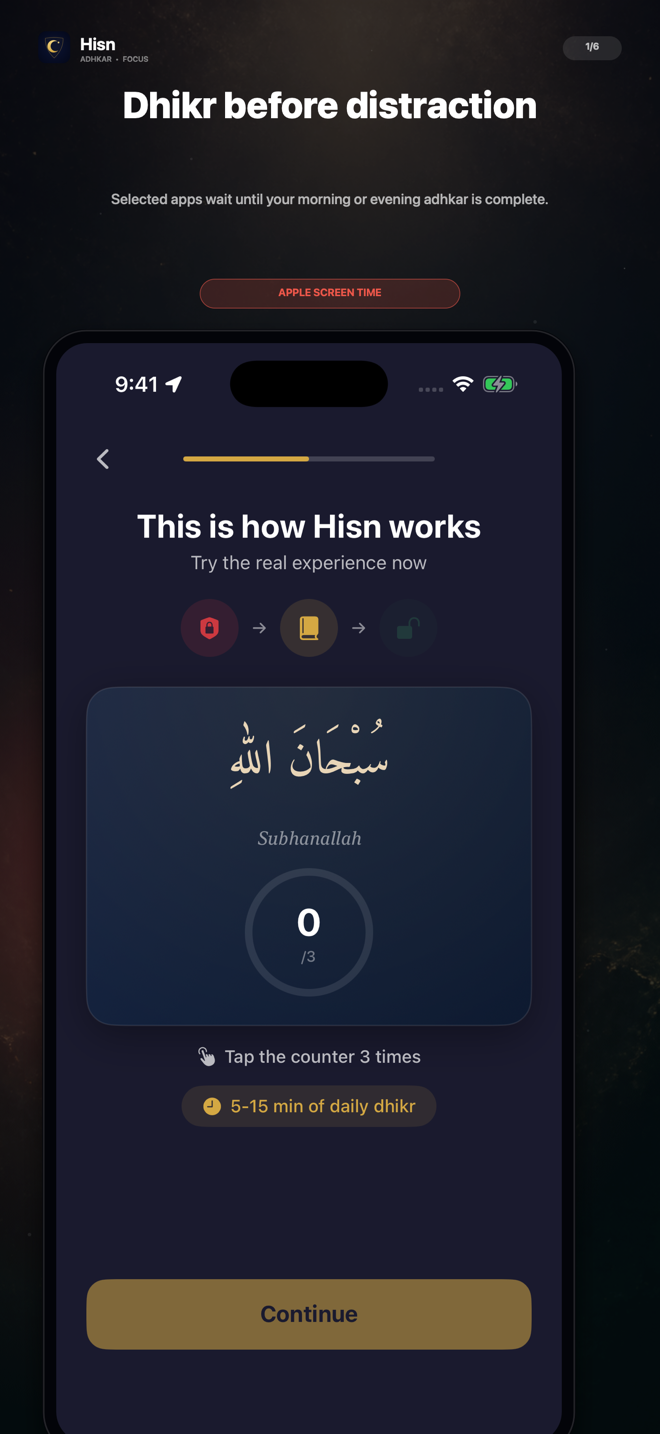
Replace one automatic phone transition with a deliberate sequence: choose what waits, complete your routine, then decide what comes next.
01 · PRACTICAL GUIDE
Start with the transition, not the screen-time total
The first scroll of the day rarely begins with a careful decision. You unlock the phone for one reason, notice an app, tap it, and suddenly your attention has moved somewhere else. A dhikr-before-scroll routine does not need to make the phone disappear. Its job is smaller and more realistic: change what happens between the impulse and the tap.
That distinction matters. A routine built around an impossible promise—never becoming distracted, never opening a selected app—can collapse after one imperfect morning. A routine built around a repeatable sequence can still be useful: selected apps wait, the morning or evening adhkar routine comes into view, and you decide what to do after completion.
Hisn is designed around that sequence. It uses Apple’s Screen Time technology for apps you select, while keeping the choice and the schedule under your control. It is a deliberate pause, not a claim that every distraction can be eliminated.
02 · PRACTICAL GUIDE
Set up a routine you can recognize
A clear trigger is easier to follow than a vague intention to use the phone less. Pick a moment you already recognize, such as the first time you reach for a social or entertainment app in the morning, or the point in the evening when casual browsing usually begins.
Then make the boundary specific. You do not need to select every app on the device. Begin with the few apps most closely connected to the transition you want to change. The aim is to make the routine understandable at a glance: when one of these apps calls for your attention, adhkar comes first.
- 1Choose one daily window
Begin with either the morning or evening routine. A single dependable window is easier to evaluate than changing the whole day at once.
- 2Select the relevant apps
Choose the apps or categories that usually start the automatic scroll. Keep the first list short enough that its purpose remains obvious.
- 3Prepare the reading view
Use the display options that help you follow the routine, including Arabic, transliteration, translation, and the tap counter where needed.
- 4Complete, then choose
After the routine, return only if that still matches what you intend to do. The pause creates a decision point; it does not make the decision for you.
Choose what waits, complete the routine, then return with intention.
03 · PRACTICAL GUIDE
Use a seven-day check, not a perfect streak
For the first week, measure whether the sequence is understandable and repeatable. You are not trying to prove that a phone habit has been permanently fixed. Ask simpler questions: Did the selected apps wait at the expected time? Was the routine ready when you needed it? Did you know what to do after completion?
If the answer is no, change one element. Move the schedule, reduce the selected-app list, or make the reading view easier to follow. Changing everything at once makes it difficult to know what helped.
A missed day is information, not a reason to abandon the structure. Look for the point where the sequence became unclear. A useful routine should reduce decisions at the moment of distraction, while leaving the larger choices with you.
- Keep the same morning or evening window for seven days.
- Change only one setting when the flow is not working.
- Judge the sequence by clarity and repeatability, not by an invented productivity score.
- Keep selected-app choices and routine progress private on your device.
04 · PRACTICAL GUIDE
What Hisn adds to the routine
A handwritten plan can define the intention, but the difficult moment still happens on the phone. Hisn brings the boundary and the routine into the same flow. You choose the apps that should wait, open the relevant morning or evening routine, and complete it before returning.
The adhkar reader keeps Arabic, transliteration, translation, and counting controls together. Prayer times and Qibla are available alongside the routine, so the app can remain a focused daily companion rather than another crowded attention dashboard.
No Hisn account is required. The focus choice is yours, and the product does not promise an unbreakable lock, a medical outcome, or a guaranteed change in behavior. Its value is specific: helping you put remembrance before selected distractions.
05 · PRACTICAL GUIDE
A small routine can still be a meaningful boundary
You do not need an elaborate phone system to begin. Choose one window, one small group of apps, and one clear next step. When the routine finishes, decide whether returning to the selected app is still worth your attention.
That is the full loop: choose, remember, return with intention. If this is the phone transition you want to build, Hisn is available for iPhone and iPad.
CLEAR ANSWERS
Questions about the routine
Can I choose which apps wait during the routine?
Yes. Hisn lets you choose the apps or categories connected to your morning or evening routine.
Does Hisn make selected apps impossible to open?
Hisn does not make that absolute claim. It uses Apple’s Screen Time technology to create a user-controlled pause while the routine is active.
Do I need a Hisn account?
No. Hisn does not require an account.
Is Hisn available on Android?
This guide covers the current iPhone and iPad app. Use the App Store link below to check current device compatibility.
This guide describes Hisn’s current iPhone and iPad focus flow without promising a guaranteed behavioral, medical, or religious outcome. Current App Store availability and device compatibility are shown by Apple.