
PRAYER & QIBLA
Prayer Times and Qibla on iPhone: A Simple Daily Check
Use a simple iPhone routine to check the next prayer, review five daily prayer times, and find Qibla without creating another account.

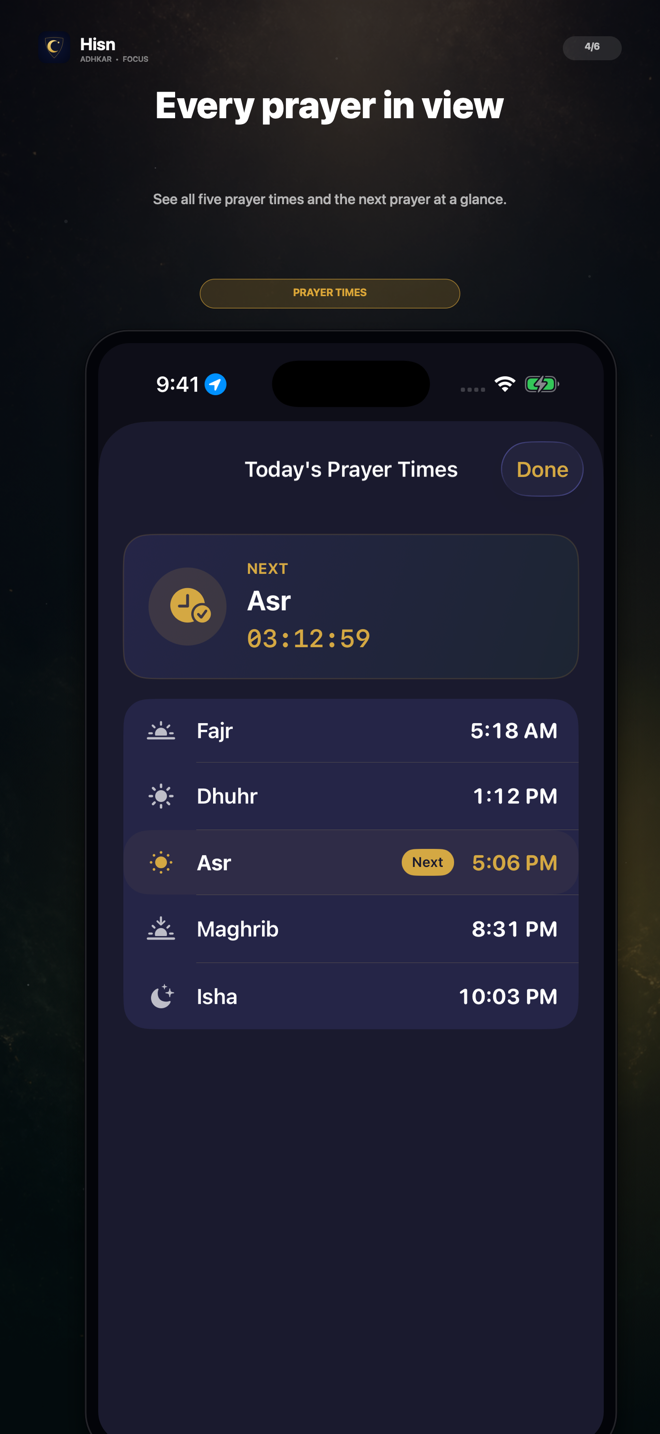
Answer two practical questions—what comes next, and which direction to face—then return to the rest of your day without turning the check into another feed.
01 · PRACTICAL GUIDE
Separate the two questions
A prayer-time check usually begins with one of two practical questions: what comes next, or which direction should I face? They are related, but they do not need the same screen or the same amount of attention. Treating them as separate questions makes the phone check faster to understand.
When you need the time, start with the next prayer. A clear next-prayer view gives you the immediate answer without asking you to scan the whole day. Open the full list of five daily prayer times only when you need to plan beyond the next one.
When you need direction, move deliberately to Qibla. A compass is a task, not a feed: open it, follow the on-screen guidance, confirm the direction, and leave. This small distinction keeps a useful phone check from expanding into unrelated browsing.
02 · PRACTICAL GUIDE
Build a check you can repeat
A dependable routine should be easy to remember in an unfamiliar room, during a busy day, or when your schedule changes. Use the same short order each time so that you do not have to rediscover where the relevant information lives.
The sequence below is intentionally simple. It does not ask you to create a complex dashboard or record personal notes. It answers the immediate question, gives you a clear next step, and lets you return to what you were doing.
- 1See the next prayer first
Use the next-prayer card for the immediate answer. Keep the full-day list closed when you do not need it.
- 2Review all five times when planning
Open the daily list when you need to understand the shape of the day rather than only the next transition.
- 3Open Qibla only for direction
Move to the compass when direction is the actual question, then follow the device and on-screen alignment guidance.
- 4Close the loop
Once the question is answered, leave the check instead of drifting into another app or another round of browsing.
See prayer times, open Qibla, and keep your adhkar routine close.
03 · PRACTICAL GUIDE
Keep the check useful when the day changes
A routine is most useful when it still makes sense outside the ideal setup. Travel, a different workday, or simply being in another room can change which question matters first. The structure can stay stable even when the circumstances do not.
If you are planning the day, begin with the five-time overview. If you are already preparing and only need direction, go straight to Qibla. If you only want to know what comes next, stop after the next-prayer card. The routine should become shorter when the question is smaller.
Avoid treating one phone display as a guarantee that every surrounding condition is correct. Device sensors and local settings can affect a compass experience. Follow the app’s alignment guidance, keep the device away from obvious magnetic interference, and compare with trusted local information when a setting seems uncertain.
- Use the next-prayer view for the immediate transition.
- Use the five-time list for broader daily planning.
- Use Qibla when direction is the specific question.
- Follow on-screen alignment guidance instead of guessing from a tilted device.
- End the check when the practical question is answered.
04 · PRACTICAL GUIDE
Make privacy part of the routine
A daily religious companion does not need to begin with a profile. If the main job is to show prayer times, provide Qibla, and keep an adhkar routine nearby, an account can add unnecessary setup to a question that should remain simple.
Hisn does not require an account. Prayer settings, selected-app choices, and routine progress are designed to stay on your device. That boundary matters because the check can remain a practical device action rather than becoming a social identity, public streak, or advertising profile.
Privacy also means collecting less from yourself. You do not need to write a note about every check or turn the routine into a score. Keep only the settings that help the app answer the question you actually have.
05 · PRACTICAL GUIDE
Where Hisn fits in the daily check
Hisn brings five daily prayer times, a next-prayer view, and Qibla beside its morning and evening adhkar routine. The prayer and direction tools are companions to the core idea, not an excuse to crowd the app with a feed.
The same product also supports a separate focus boundary: apps you choose can wait during an active morning or evening adhkar routine through Apple’s Screen Time technology. That focus flow is user-controlled and does not mean every app is impossible to open in every circumstance.
If you want one place for the immediate prayer-time question, Qibla, and a dhikr-before-distraction routine, start by testing the smallest useful sequence. Check what comes next, open direction only when needed, and return to the day once the answer is clear.
CLEAR ANSWERS
Questions about the routine
Does Hisn show all five daily prayer times?
Yes. Hisn includes the five daily prayer times and a next-prayer view alongside the adhkar routine.
Does Hisn include a Qibla compass?
Yes. Hisn includes Qibla with on-screen alignment guidance. Device conditions can affect compass readings, so follow the guidance shown on the device.
Do I need to create a Hisn account?
No. Hisn does not require an account.
Can I use the prayer and Qibla tools without setting up every focus feature?
Yes. The prayer-time and Qibla check can remain a small, practical routine. The selected-app focus boundary is a separate user-controlled flow.
This guide describes Hisn’s current iPhone and iPad focus flow without promising a guaranteed behavioral, medical, or religious outcome. Current App Store availability and device compatibility are shown by Apple.